OLEDB Database Action#
Use this action to write matched events or messages to a database through an OLEDB provider.
This action serves the same main use cases as ODBC Database Options, but it connects through OLEDB instead of an ODBC System DSN. It can write to the built-in Adiscon default schema or to a user-defined schema. Provider availability depends on your Windows environment and the database vendor’s current OLEDB support.
When to choose OLEDB#
You already have a supported OLEDB provider for the target database.
Your environment standardizes on OLEDB rather than ODBC.
You need the same database-writing and field-mapping behavior but through an OLEDB connection path.
Use the ODBC action instead when your preferred or only supported driver path is ODBC.
Before you start#
Verify that the required OLEDB provider is installed on the Windows host.
Confirm the server, database, and authentication details that the provider expects.
Decide whether you want the default Adiscon schema or an existing custom schema.
Ensure the target account has the required database permissions.
Minimal action path#
Configure the OLEDB connection.
Use Verify Database to test the connection.
Choose one of these paths:
use Create Database for the default schema, or
set the table name and field list for a custom schema
Save and apply the configuration.
Send a matching test event or message and verify that rows are inserted.
Connection options#
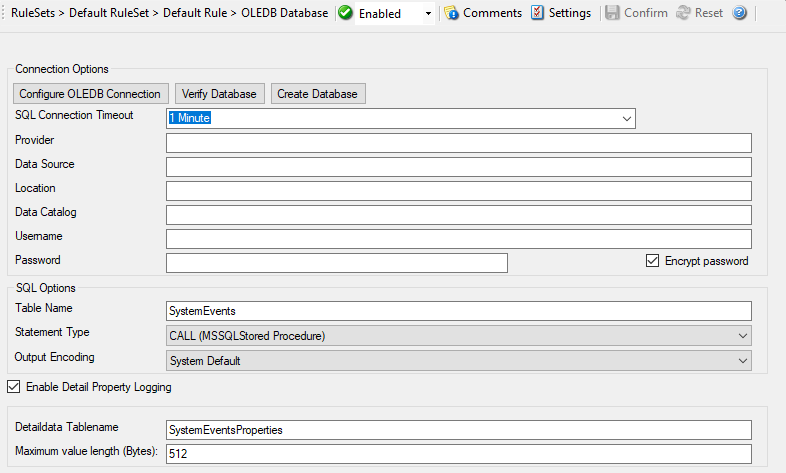
Action - OLEDB Database Connection
SQL Connection Timeout#
- File Configuration field:
nSQLConnectionTimeOut
- Description:
Maximum time to wait while opening the database connection.
Provider#
- File Configuration field:
szProvider
- Description:
OLEDB provider name. Use a provider that is actually installed and supported in your environment.
Data Source#
- File Configuration field:
szDataSource
- Description:
Server, instance, or provider-specific data source identifier.
Location#
- File Configuration field:
szLocation
- Description:
Optional OLEDB location setting if your provider requires it.
Data Catalog#
- File Configuration field:
szDataCatalog
- Description:
Database name or catalog, depending on the provider.
Username#
- File Configuration field:
szUsername
- Description:
User name for database authentication, if required by the provider.
Password#
- File Configuration field:
szPassword
- Description:
Password for the configured user.
Encrypt password#
- Description:
Enable password encryption if your build exposes this option. As with ODBC, prefer encrypted storage unless you have a documented reason not to.
Table Name#
- File Configuration field:
szTableName
- Description:
Target table name for database writes. Keep the default
SystemEventswhen you use the built-in schema. Set it to your existing table when integrating with a custom schema.
Statement Type#
- File Configuration field:
nSQLStatementType
- Description:
Selects whether the action uses a standard
INSERTstatement or a Microsoft SQL Server call statement for stored procedures. The call-statement path is Microsoft SQL Server specific.
Output Encoding#
- File Configuration field:
nOutputEncoding
- Description:
Controls how string data is encoded when written. In most environments, System Default is the correct setting unless you have a confirmed character-set requirement.
Data mapping and custom schemas#
The field list works the same way as in ODBC Database Options. It controls which event properties are written to which destination columns.
For custom integration:
set the table name to your existing table
keep only the fields that exist in that table
make each field name, field type, and field content match the destination schema deliberately
For string fields, you can use property-replacer expressions such as
%msg:1:200% when you need truncation or transformation.
If you use the default schema, keep the default field list unchanged unless you understand the compatibility impact on tools that expect the standard Adiscon layout.
Detail property logging#
- File Configuration field:
nPropertiesTable
- Description:
Writes non-standard properties into a separate detail table. This increases write volume and is usually needed only when you intentionally want those additional properties retained.
Detaildata Tablename#
- File Configuration field:
szPropertiesTableName
- Description:
Table name used for detail-property logging. In the default schema, this is typically
SystemEventProperties.
Maximum value length (Bytes)#
- File Configuration field:
nMaxValueLength
- Description:
Maximum size in bytes for values written into the detail-property table.
Action Queue Options#
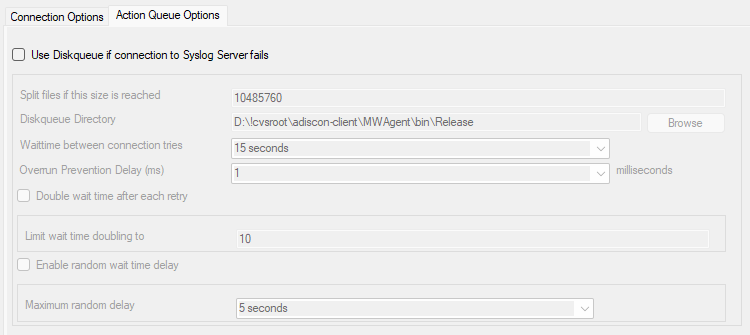
Action - OLEDB Database Action Queue
Use Diskqueue if connection to database fails#
- File Configuration field:
nUseDiscQueue
- Description:
Stores pending writes on disk when the database path is temporarily unavailable.
Split files if this size is reached#
- File Configuration field:
nDiskQueueMaxFileSize
- Description:
Maximum size of each queue file in bytes before a new file is created.
Diskqueue Directory#
- File Configuration field:
szDiskQueueDirectory
- Description:
Directory used to store queue files for pending database writes.
Waittime between connection tries#
- File Configuration fields:
nDiskCacheWait
- Description:
Minimum wait time before the action retries the database connection after a failure.
Overrun Prevention Delay (ms)#
- File Configuration field:
nPreventOverrunDelay
- Description:
Optional delay between replayed queue writes to avoid overwhelming the target database after recovery.
Double wait time after each retry#
- File Configuration field:
bCacheWaittimeDoubling
- Description:
Doubles the retry wait time after each failure.
Limit wait time doubling to#
- File Configuration field:
nCacheWaittimeDoublingTimes
- Description:
Maximum number of retry doublings after repeated failures.
Enable random wait time delay#
- File Configuration field:
bCacheRandomDelay
- Description:
Adds a randomized delay to retry timing. This can reduce synchronized retry spikes when many senders reconnect at the same time.
Maximum random delay#
- File Configuration field:
nCacheRandomDelayTime
- Description:
Upper bound for the additional randomized retry delay.
Common pitfalls#
Assuming OLEDB is required when a supported ODBC path is simpler
Relying on provider names or examples from older Windows environments without verifying that the provider is still installed and supported
Using the default field list unchanged while targeting a custom table
Expecting the action to design a custom schema automatically