How to setup MonitorWare Products to use MySQL as database?
Created on 2002-08-09 by Andre Lorbach.
To use a MySQL Database with WinSyslog, EventReporter or MonitorWare Agent, you need to install some components (If you haven’t) first. Go to http://www.mysql.com/downloads/index.html. If you don’t have any MySQL Server, download MySQL-3.23.5 for Windows for example (Or a newer version if there is one).
Most important, you need to download an install the ODBC Drivers (myodbc-2.50 for example) for MySql. This is needed, because WinSyslog will use a ODBC-Driver for MySQL to access the database.
Note: If you are upgrading from MonitorWare Agent 1.x to 2.x, you would need to creat the SystemEventsProperties table. If you are upgrading from 4.x to 5.x or higher you would need to create the SystemEventsProperties table. Similarly if you are upgrading from 5.x (or any other previous version) to 6.x or higher you would need to create the SystemEventsProperties table.
1. On your MySQL Server, create a new database. The script below shows you an example:
CREATE database MyWinSyslog;
CREATE table SystemEvents
(
ID int IDENTITY (1, 1) NOT NULL,
SystemID int,
ReceivedAt datetime,
DeviceReportedTime datetime,
Facility int,
Priority int,
FromHost nvarchar (60),
Message text,
NTSeverity int,
Importance int,
EventSource nvarchar (60),
EventUser nvarchar (60),
EventCategory int,
EventID int,
EventBinaryData text,
CurrUsage int,
MinUsage int,
MaxUsage int,
MaxAvailable int,
InfoUnitID int,
SysLogTag varchar(60),
EventLogType varchar(60),
GenericFileName VarChar(60),
Checksum int NULL,
CustomerID int
);CREATE table SystemEventsProperties
(
ID int IDENTITY (1, 1) NOT NULL ,
SystemEventID int NULL ,
ParamName varchar (255) NULL ,
ParamValue text NULL
);GRANT ALL MyWinSyslog.* To “database username@YourDNS or machine ip” IDENTIFIED BY”YourPassword”;
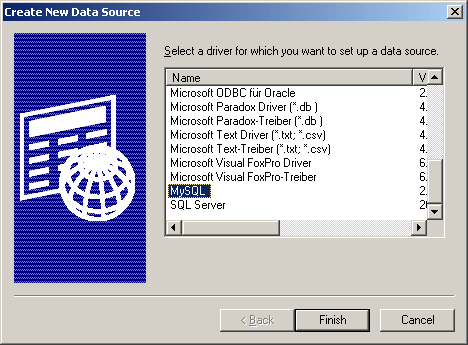
2. After you install the ODBC components, you will need to add a new ODBC System DSN. See the screenshot below which shows you the first step of the Wizard:
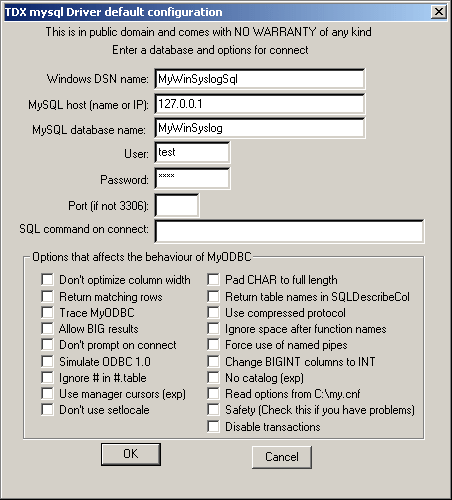
3.The screenshot below shows how all values could be filled in. But this depends on your configuration and names:
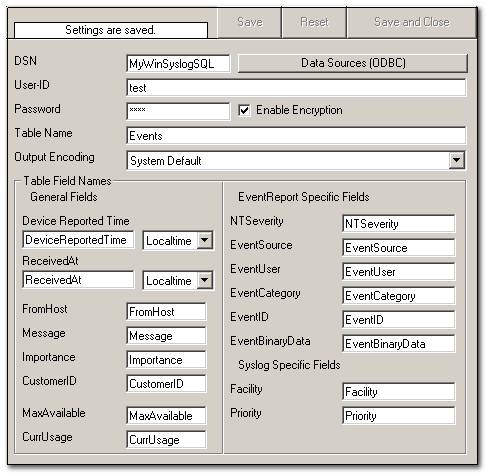
4. Now configure a Database Logging action in WinSyslog. In the Screenshot below, I used the values I specified before.