FAQ  
 

How to monitor a file on a remote machine?

Created on 2003-08-07 by Michael Meckelein.

By default, MonitorWare Agent service uses the local system account. This account has no permission on remote machines. If you want to monitor a file on a remote system, the MonitorWare Agent service must log on as a user with administrator rights. This user must be exist on both system, local and remote. Also be sure, that the password is equal on all machines or - preferrably - use a domain account.

Here are the steps for monitoring a file on a remote machine:

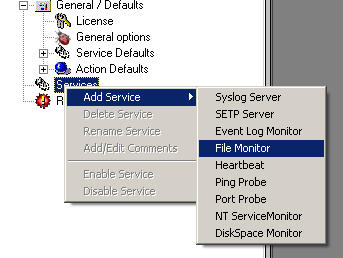
  1. Add a File Monitor service

    filemonitor

  2. Use an UNC name for 'File and path name', e.g. \\remotemachine\share\filename.log

    uncname

  3. Go to administrative tools -> Services
  4. Right click on AdisconMonitorWareAgent and select properties
  5. Select the 'Log On' tab and check Log on as: 'This account'
  6. Enter a user with admin rights, this user must still exit on the remote machine!
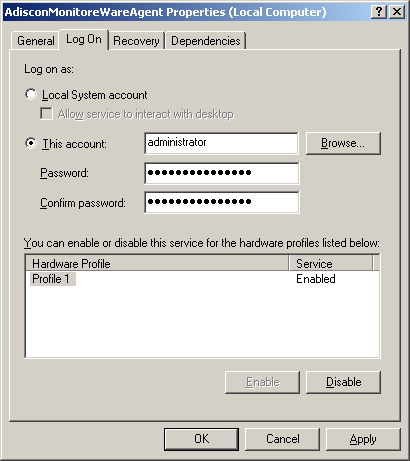
    logontab


MonitorWareAgent
 Home
 Product Info
General Information
MonitorWare Products
Edition Comparison
Order and Pricing
Upgrade Insurance Info
News Releases
Version History
Product Tour
 - Screenshots
 Download
 Reference library
General Information
Step-by-step guides
 - All
 - MW Agent 4.0
 - Installation and Configuration
 - Services related
 - Actions related
 - MW Agent All Versions
Common Uses
Centralized monitoring
Security Reference
 Help
Support
Manual
FAQ
 - All
 - General questions
 - Configuration related
 - Installation and Configuration
 - Services related
 - Actions related
 - Central Monitoring
Articles
Seminars Online
 - All
 - General
 - MonitorWare Agent
 Order & pricing
Order now
Editions
Pricing Information
Upgrade Insurance Info
Local Reseller
 Contact Us
 Search


Printer Version Send this page to a friend

Copyright © 1988-2005 Adiscon GmbH All rights reserved.
Contact us via Secure Web Response | Privacy Policy
Topic Links: syslog | Free Weblinks Directory