Creating a Rule Set for Database Logging

Applies to MonitorWare Agent, WinSyslog and EventReporter

This is a very quick step-by-step guide. It essentially is a step in multiple configurations. You can refer to this guide whenever you need to add database logging to one of your services.

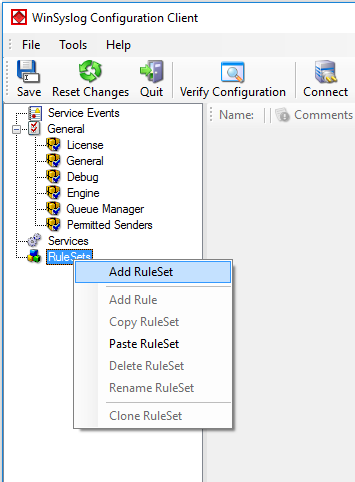
To define a new rule set, right click “RuleSets”. A pop up menu will appear. Select “Add RuleSet” from this menu.
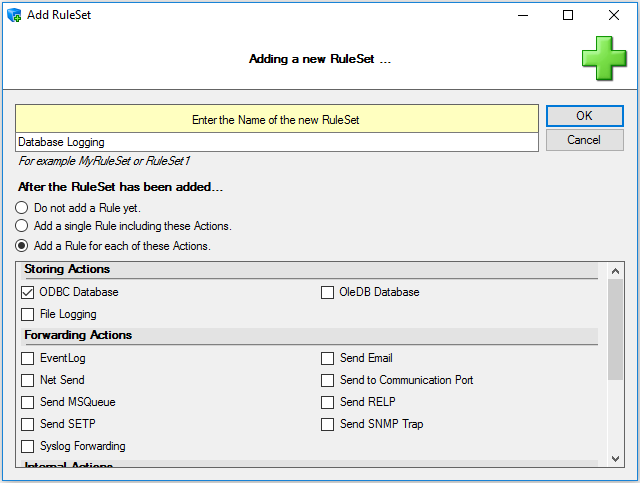
Then, a new window opens. Change the name of the rule set to whatever name you like. We will use “Database Logging” in this example. Select only ODBC Database. Do not select any other options for this sample. Also, select the “Create a Rule for each of the following actions” setting. Click “OK” to create the rule set. The screen looks as follows:
The window closes and the client shows a newly created rule set.
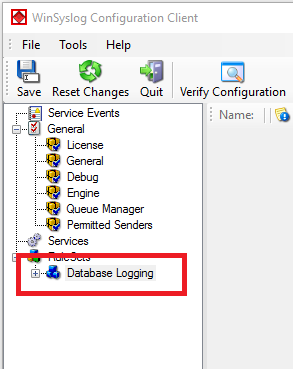
As you can see, the new RuleSet “Database Logging” is present. Please expand it in the tree view until the action level of the “Database Logging” Rule and select the “Database Logging” action to configure.
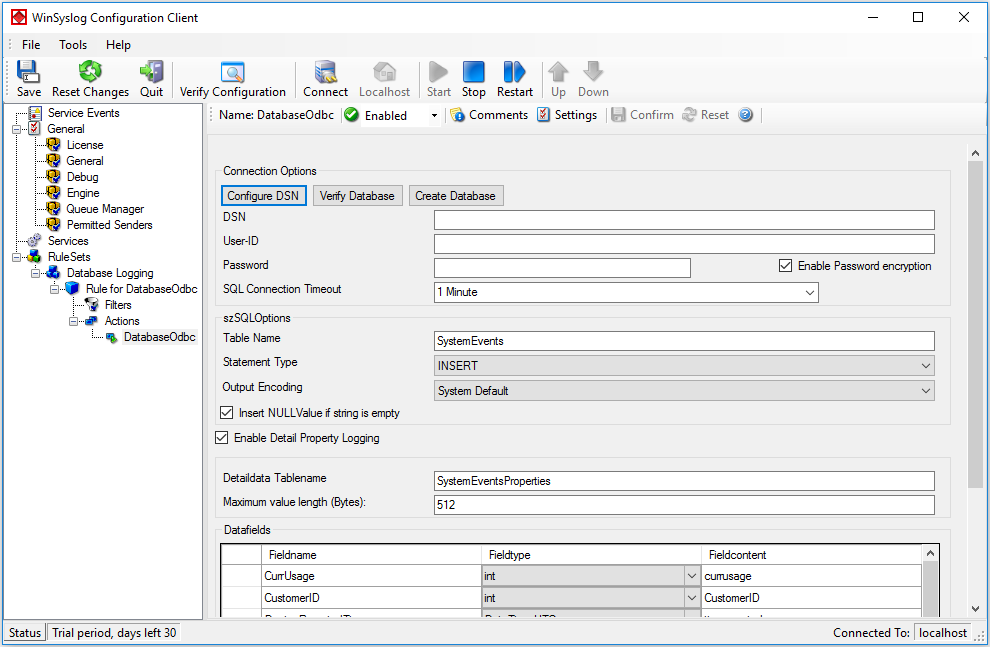
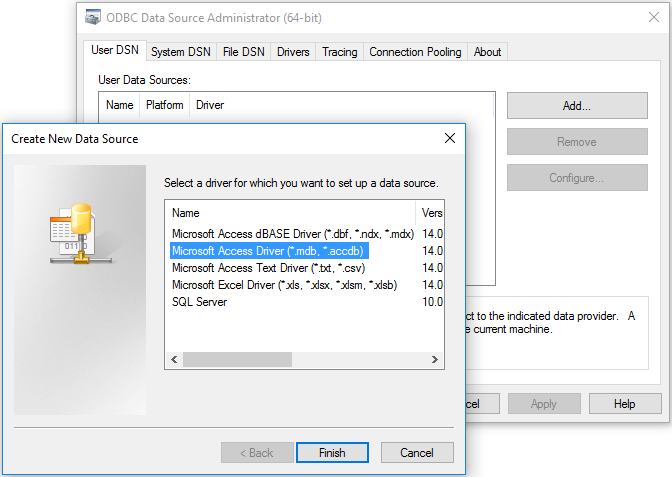
Now click on the Configure DSN Button to open the ODBC Data Source Administrator. Now click on the System DSN tab and click the Add button to add a new System-DSN (Select the Microsoft Access driver like in the screenshot below).
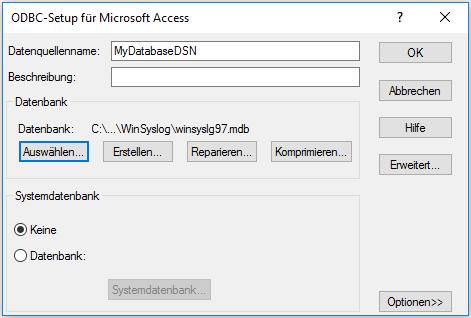
In the next step, click the Select button and go to the Winsyslog directory (Usually C:program files/Winsyslog) and choose the sample database called winsyslg97.mdb. After that name the new DSN with “MyDatabaseDSN” like in the following screenshot and press OK.
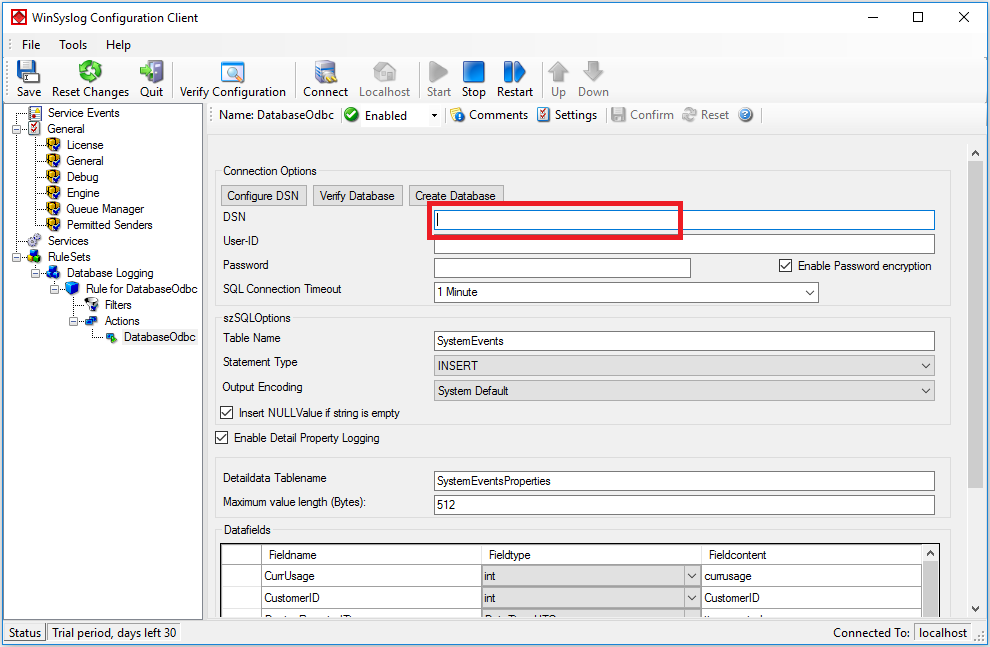
Now close the ODBC Data Source Administrator and switch back to the Winsyslog Client and insert MyDatabaseDSN in the DSN field. Leave all other settings in their default.
This finishes the setup for a simple Action for Database Logging.

MonitorWare Agent 15.1 Released

Release Date: 2025-07-16

Build-IDs: Service 15.1.0.568, Client 15.1.0.1651

Enhancements

  • Log Rotation: Complete refactoring of the LogRotation system with improved architecture and better error handling.
  • Mail Action: Modernized SMTP logic, better session management, and enhanced error handling.
  • File Action: Enhanced capabilities with improved rotation logic and better resource management.
  • Event Log Monitor V2: Added microseconds support for EventLog timestamps to improve precision and RFC compliance.

Bugfixes

  • Mail Action: Improved Base64 encoding robustness and addressed silent email delivery issues.
  • File Action: Fixed file handle cleanup on compression failure to prevent resource leaks.
  • Filter Engine: Fixed an issue where the REGEX Filter could cause the program to use more memory over time.
  • Event Log Processing: Fixed category cache key to include event ID for proper security event log handling.
  • Timestamp Processing: Resolved double conversion when using timestamp localization in property engine.

You can download Free Trial Version of MonitorWare Agent.

MonitorWare Agent 15.0 Released

Release Date: 2025-01-23

Build-IDs: Service 15.0.0.565, Client 15.0.0.1650

Enhancements

  • DTLS Action: Added support for DTLS Action to enhance secure logging capabilities over the UDP protocol.
  • Property Engine: Added microseconds support to timestamps for improved precision (When parsing RFC 5424 timestamps).
  • OpenSSL: Updated OpenSSL library to a newer version and added TLS v1.3 compatibility testing.
  • RELP Action: Introduced custom output encoding options for improved flexibility.
  • File Action: Enabled post-processing options (e.g., compression and backup) without triggering mandatory log rotation.

Bugfixes

  • Syslog Action: Fixed memory leak in RFX5424 Syslog Header processing.
  • File Action: Improved handling for “LogRotation by time of the day” to prevent duplicate log rotations on the same day after restart.
  • Database Actions: Enabled Action Queue support for ODBC and OLEDB database actions.
  • Logging: Resolved unexpected log rotation during configuration reload.
  • Engine: Fixed invalid parameter issue during char-to-wchar_t conversion.

You can download Free Trial Version of MonitorWare Agent.

MonitorWare Agent 14.5a Released

Release Date: 2024-05-29

Build-IDs: Service 14.5.0.559, Client 14.4.0.1645

Bugfixes

  • File Action: Fixed an issue with circular and segmented file logging when configured size was above 2GB.
  • Log Rotation: Fixed an issue with log rotation when Log rotation Size was above 2GB.
  • Log Rotation: Fixed unintended log rotation on configuration reload when Log rotation on Close was enabled.

You can download Free Trial Version of MonitorWare Agent.

MonitorWare Agent 14.5 Released

Release Date: 2023-10-18

Build-IDs: Service 14.5.0.558, Client 14.4.0.1645

Bugfixes

  • Relp Action: Updated to latest librelp version 1.11.0.
  • File Action: Fixed a race condition in Filename handling that could cause a problem under heavy load and stress conditions.
  • Filter Engine: Fixed incorrect greater / lower filter handling of IP Type Filter.
  • Network Core: Suppressed network error debug output during interrupts if connection is in shutdown state.

You can download Free Trial Version of MonitorWare Agent.

MonitorWare Agent 14.4 Released

Release Date: 2023-06-21

Build-IDs: Service 14.4.0.556, Client 14.4.0.1645

Bugfixes

    • Syslog Action: Fixed a very rare case where an Action could try to open **TCP connections** to the same target **multiple times simultaneously**. The handling has been hardened to avoid concurrent connection establishment retries for the same Action.
    • Syslog Action: Fixed error handling when **the** connection fails and Syslog Caching is enabled. If a syslog backup server is enabled, the action will now retry the primary server correctly again after syslog caching has been activated.
    • EventLog Monitor V2: Fixed an issue in XML-Stream Processing that could cause failure in processing an EventLog Message.
    • Send Email: Fixed an issue handling server multiline replies. Some mailservers return multiline replies when additional protocol data is to be returned. In some cases, these additional protocol data **were** not detected correctly, causing the Action to fail.
    • LogRotate: Corrected error reporting when the feature is not available **due to** licensing.
    • Network Core: **Enhanced stability** during closing connections.

You can download Free Trial Version of MonitorWare Agent.

MonitorWare Agent 14.3 Released

Release Date: 2022-11-09

Build-IDs: Service 14.3.0.554, Client 14.3.0.1644

Bugfixes

  • Send Email Action: Fix a RFC5322 protocol issue when multiple recipient were used.
  • Debuglog: Fix output of port numbers in debug logging.
  • Fix daylight detection when converting from strings to timestamps internally.
  • Write File Action: Fix a race condition when files were closed that could lead to unexpected Exceptions in Worker Threads under very heavy IO load.
  • Relp Action/Service: Fix a establish session problem that was caused due the last librelp version update of 1.8.0 in Version 14.0
  • librelp: Updated to version 1.10.0
  • OpenSSL: Updated to version 1.1.1q

You can download Free Trial Version of MonitorWare Agent.

MonitorWare Agent 14.2a Released

Release Date: 2022-03-03

Build-IDs: Service 14.2.0.552, Client 14.2.0.1642

Bugfixes

  • EventLog Monitor V2: Fix an issue with events, that cannot be formatted properly.
  • EventLog Monitor V2: Fix loading enabled state for Event Channels when either Debug or Admin channels are enabled/disabled.
  • EventLog Monitor V2: Fix the default Channel enabled state for disabled channel types.
  • File Action: Hardened File Close handling in order to increase stability on high io load situations.

You can download Free Trial Version of MonitorWare Agent.