
Forwarding filtered IIS Logfiles
Created 2006-04-19 by Timm Herget
Please note: In order to forward the IIS logs you need MWAgent.
Step 1
First, create a new RuleSet, in our sample we named it ForwardSyslog, and bind an ForwardSyslog ,or any other action you want to use for forwarding (e.g. SendEmail), to it. In our sample we now must define the syslog server where we want to forward it to:
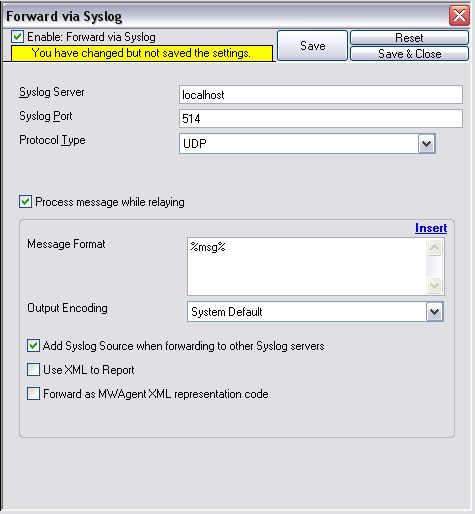
Figure 1: Creating the ruleset and its action
Step 2
Then create your Filemonitor and point it to the location of your IIS Logfile which you want to monitor.
(Note: Daily Internet Information Server log files are named “exyymmdd.log”, with yy being the 2 digit year, mm the month and dd the day of month. To generate the same name with file monitor, use the following name “ex%y%m%d.log”.)
Set the Logfile Type to “W3C WebServer Logfile” and assign it to your newly created RuleSet (in our case its ForwardSyslog).
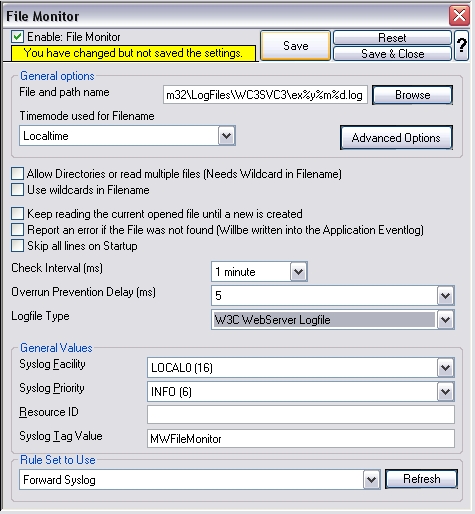
Figure 2: Creating and configuring the filemonitor
Step 3.1
Click on the FilterConditions Tab of your newly created RuleSet, which contains your forwarding action (in our case the ForwardSyslog ruleset). Set the filters as shown on the screen below. In our sample we want to forward every log entry, excepting accesses from client ip (c-ip) 127.0.0.1 so we set the operator to AND and use a Custom Property. Set the Property Name to “p-c-ip”, the compare operation to “does not contain” and the Property Value to “127.0.0.1”. In pseudo code this looks like this:
- if (IP != “127.0.0.1”)
{
forward the logentry
}
else
{
discard the logentry
}
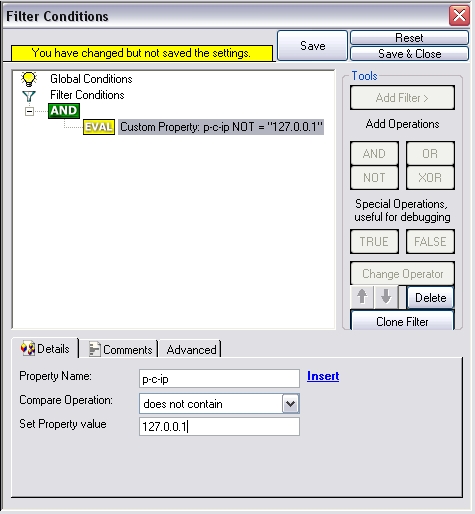
Figure 3: Setting up the filterconditions
Step 3.2
Of course you can add as many ip’s to filter out as you want to. Simply change the introducing AND to OR and set those filters.
To do so simply click on the AND and then on “Change Operator”.
This means “If ip-x OR ip-y OR ip-z are not found, do x”:
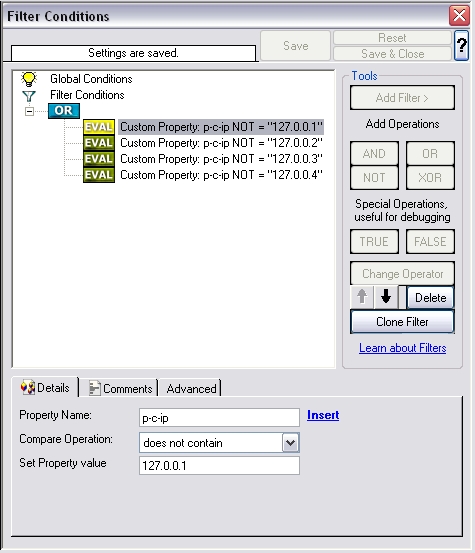
Figure 4: Advancing filterconditions part one
Step 3.3
If you would specify the filters in that way, that you only want to forward some specific IP’s and not, as we mentioned above,
all excepting some specific then set the initial operator to OR and the filteroption from “does not contain” to “must contain”
and configure your IP filters:
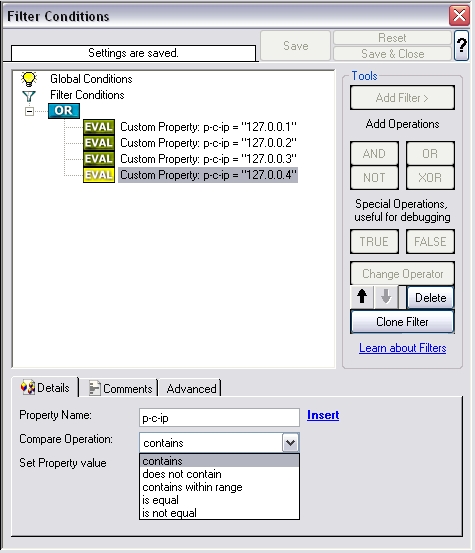
Figure 5: Advancing filterconditions part two
(Note: There are some more special IIS filter options, read more in the online manual.)