Passive Syslog Listener#
The Passive Syslog Listener Service is a tcp based Listener Service that sends messages from a Syslog Queue to any remote host, that connects to it. Connections can be secured with TLS including certificate based authentication. Additionally, a greeting and response message can be configured as well.
In order to use the Passive Syslog Listener, you have to configure at least one syslog queue action within your configuration first!
When configured and running, you can click the Test Passive Syslog server button in order to open a new window that will help you testing the Passive Syslog Listener. Make sure the Service is started (or restarted) after you finished the configuration of the Passive Syslog Listener. The test window will automatically be filled with correct properties and is ready to go. If the test succeeds, the data grid should rapidly fill with queued syslog messages.
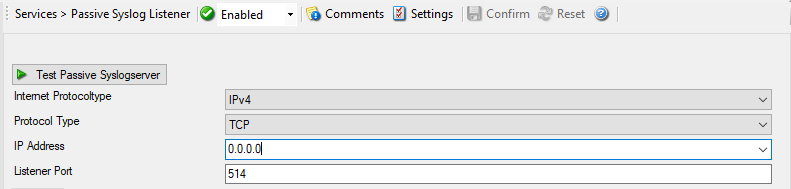
Service - Passive Syslog Listener*
Internet Protocoltype#
- File Configuration field:
nInetType
- Description:
Select the desired protocol type. IPv4 and IPv6 are available. The IPv6 protocol needs to be properly installed in order to be used. Note that one Service can only handle IPv4 or IPv6, so if you want to use both protocols, you will need to create two separate services.
Protocol Type#
- File Configuration field:
nProtocolType
- Description:
Currently only TCP is supported for the Passive Syslog Listener.
IP Address#
- File Configuration field:
nProtocolType
- Description:
The Syslog server can now be bound to a specific IP address. You can either use an IPv4, an IPv6 Address, or a Hostname that resolves to an IPv4 or IPv6 Address. This feature is useful for multihome environments where you want to run different Syslog Servers on different IP Addresses. Please note that the default IP Address
0.0.0.0means ANY IPv4 Address and"::"means all available IPV6 Addresses.
Listener Port#
- File Configuration field:
nListenPort
- Description:
The port the Syslog server listens on. The typical (standard) value is 514. This should be changed only if there is a definite need for it. Such a need typically arises from security concerns. If the port is changed, all reporting devices (routers, printers …) must also be configured to use the non-standard port.
General Options#
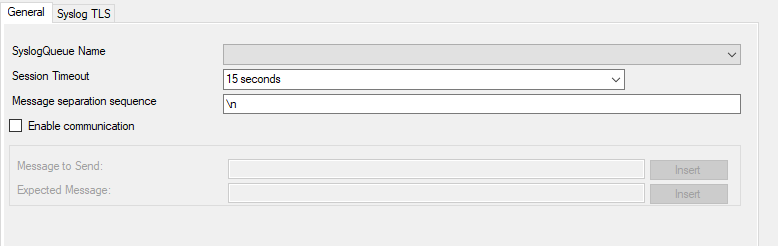
Service - Passive Syslog Listener General Tab*
SyslogQueue Name#
- File Configuration field:
szSyslogQueue
- Description:
Selects the SyslogQueue to be used by this Service. Must be set to a valid SyslogQueue. See SyslogQueue Action for more about Syslog Queues.
Session Timeout#
- File Configuration field:
nTimeOutSession
- Description:
One of the TCP-specific options is the session timeout. This value declares, how long a TCP session may be kept open, after the last package of data has been sent. You can by default set values between 1 second and 1 day or you can use a custom value with a maximum of 2147483646 milliseconds. If you wish to disable the session timeout, you can use a custom value of 0 milliseconds to disable it.
Maximum concurrent TCP sessions#
- File Configuration field:
nTCPMaxSessions
- Description:
Limits how many TCP sessions this listener accepts at the same time. The default is
1024. A value of0disables the cap. For untrusted networks, keep a finite limit so stalled connections cannot consume an unbounded number of receiver threads.
TLS handshake timeout#
- File Configuration field:
nTLSHandshakeTimeout
- Description:
Sets the timeout, in milliseconds, used while a new TLS connection completes its handshake. The default is
30000. This setting applies before the normal TCP session timeout and helps disconnect clients that open a TLS socket but do not complete the handshake.
Message separation sequence#
- File Configuration field:
szTCPMsgSep
- Description:
This determines how you want to separate the messages. By default
\nis the value for this, as most times a message ends with a carriage return and/or a line feed. But, you can choose your own separation sequence here as well.
Enabled communication#
- File Configuration field:
nEnableCommunicate
- Description:
Activate this setting when you want to Send and Receive an expected message after the connection is established.
Message to Send#
- File Configuration field:
szMessageToSend
- Description:
Defines the message send to the Client after the connection is established. The Passive Syslog Listener will close the connection if the message does not match.
Expected Message#
- File Configuration field:
szMessageExpected
- Description:
Defines the message to be expected from the Client after our message was send. The Passive Syslog Listener will close the connection if the message does not match.
Syslog TLS#
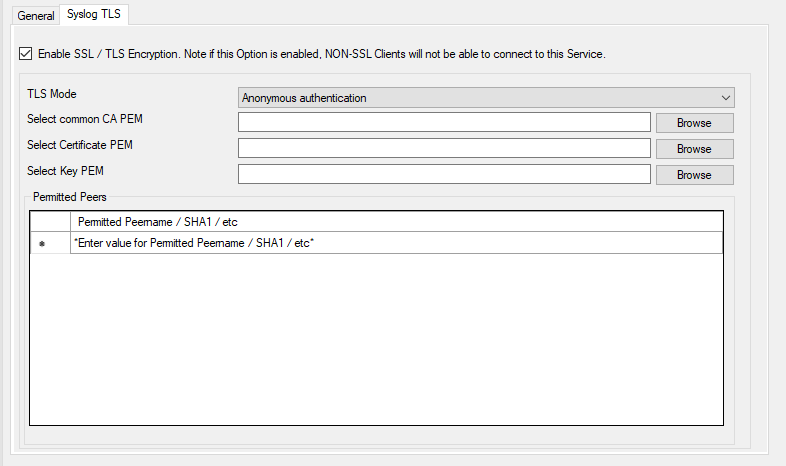
Service - Passive Syslog Listener TLS Tab*
Enable SSL/TLS Encryption#
Note: if this Option is enabled, NON-SSL Clients will be able to connect to this Service.
- File Configuration field:
nUseSSL
- Description:
This option enables SSL/TLS encryption for your Syslog server. Please note, that with this option enabled, the server only accepts SSL/TLS enabled senders.
TLS Mode#
- File Configuration field:
nTLSMode
- Description:
The TLS mode can be set to the following:
Anonymous authentication Default option, which means any client certificate will be accepted, or even none. This provides encryption without peer authentication. Use it only when that is intentional for the deployment; use one of the x509 modes when peer authenticity matters.
x509/name (certificate validation and name authentication) When this mode is selected, the subject within the client certificate will be checked against the permitted peers list. This means the Syslog server will only accept the secured connection if it finds the permitted peer in the subject. Newer hardened configurations can disable the legacy subject substring match and rely on certificate name checks instead.
x509/fingerprint (certificate fingerprint authentication) This mode creates a SHA1 Fingerprint from the client certificate it receives, and compares it to fingerprints from the permitted peers list. You can use the debuglog to see fingerprints of client certificates which were not permitted. SHA-1 fingerprint labels remain supported for RFC 5425 interoperability. Hardened configurations can disable legacy substring matching and use exact normalized SHA-1 or SHA-256 fingerprints.
x509/certvalid (certificate validation only) A Syslog Sender is accepted when the client certificate is valid. No further checks are done.
Select common CA PEM#
- File Configuration field:
szTLSCAFile
- Description:
Select the CA certificate or CA bundle used to validate certificates presented by connecting clients. If you use a CA chain, include the intermediate CA certificates first and the root CA certificate last.
Select Certificate PEM#
- File Configuration field:
szTLSCertFile
- Description:
Select the server certificate in PEM format. This is the certificate the Passive Syslog Listener presents to connecting clients. If needed, append the intermediate CA certificates after the server certificate so clients can validate the chain.
Select Key PEM#
- File Configuration field:
szTLSKeyFile
- Description:
Select the private key in PEM format that matches the server certificate. Passphrase-protected private keys are not supported.
Permitted Peers#
Permitted Peername/SHA1/etc.#
- File Configuration field:
szIP_[n]
Description:
This list contains all permitted peers. If x509/name is used, this can contain parts of the client certificate subject.
For example if you have
CN = secure.syslog.msgin the certificate subject, you can add"secure.syslog.msg"as permitted peer. Whenusing x509/fingerprint, this list holds a list of permitted SHA1 fingerprints. The fingerprints can either be generated with OpenSSL Tools, or grabbed from the debug logfile.The format is like described in RFC 5425, for example:
"SHA1:2C:CA:F9:19:B8:F5:6C:37:BF:30:59:64:D5:9A:8A:B2:79:9D:77:A0".
TLS hardening compatibility options#
- File Configuration fields:
nTLSAllowExpiredCerts, nTLSLegacyPeerNameMatch, nTLSLegacyFingerprintMatch
- Description:
These compatibility options control stricter certificate handling for authenticated TLS modes. The defaults preserve legacy behavior:
nTLSAllowExpiredCerts=1accepts expired client certificates,nTLSLegacyPeerNameMatch=1allows the historic subject substring match for x509/name mode, andnTLSLegacyFingerprintMatch=1allows the historic SHA-1 fingerprint substring match.Recommended hardened values are
0for all three settings. With those values, expired client certificates are rejected, x509/name mode uses certificate name matching, and x509/fingerprint mode requires exact normalized SHA-1 or SHA-256 fingerprints.